TEKNIK SEGALA SDN BHD
MALAYSIA
Process Control and Automation Solutions
teknik-segalacom
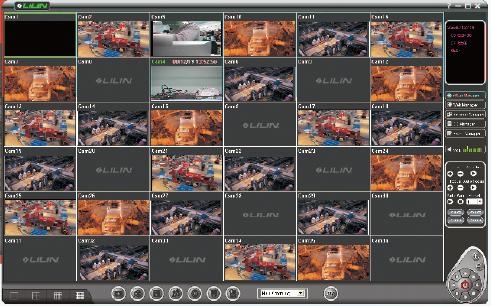
V-Guard display window with 16 cameras
1

V-Guard Digital CCTV Surveillance System
 

uuu


Available V-Guard PCI cards
VG4C - Normal Four channel video
VG4C-Plus - Normal Four channel video + Two channel audio
VG4C-XP - Advanced Four channel video + Two channel audio
VG4C-RT - Professional Four channel video + Four channel audio


VG4C Four Channel Video Interface Card


Unlimited user specified masking areas for intelligent motion detection feature


PC with V-Guard installed
MS Windows 98/Me/2000/XP

  For IP based Network Cameras

V-Guard is an advanced PC-based digital security surveillance system that does everything the conventional analog security system offers without the use of a video recorder (VCR). All recording are stored in the hard disk of the personal computer (PC) or network server. This eliminates the trouble of having to sort video tapes for recording and playback. Recordings are also tamper proof since they cannot be erased, modified or manipulated by any other commercially available software or accessed without security passwords.

The V-Guard CCTV System is perfect for security surveillance and monitoring in a wide spectrum of applications and industries such as banks, offices, car dealers, warehouses and all industrial plants including oil refineries and petrochemical plants. For sites with existing CCTV cameras, the V-Guard system can seamlessly tie-in to these cameras without requiring any modifications.

V-Guard's captured videos are digitally compressed and stored in the hard disk of personal computers or network servers. V-Guard contains a DSP (Digital Signal Processing) chip which enables all captured video files to have high and dynamic motion image compression. Size, quality and recording speed can be adjusted for better compression rate and storage capacity. Compared to other conventional analog recorders which utilize video cassettes, V-Guard is much more convenient and efficient since video clips are digitized and stored as files into a computer.

Remote monitoring is available for those who travel frequently or those who wish to monitor the actual sites without having to be there such as from the main administration building, from company HQ or from home. Remote monitoring can be achieved through PSTN (normal phone line), LAN or Internet.

For PSTN connection, all that is required is a direct phone line hooked up to a modem that is connected to the host computer with the V-Guard system installed. Over at the remote site, a notebook PC or another computer is required to perform the dial-up task.

For LAN connection, the host computer with the V-Guard installed needs to be connected to the LAN network. Multiple remote clients will then be able to log on and access the V-Guard system.

Internet connection is now available!

A simple user's interface helps users operate this remote access function. A phone book (for PSTN) and  server list (for LAN) is offered to users to store frequently used phone numbers and computer sites. Users are able to access the host computer even while it is performing the recording function at the point of access.

An excellent feature of the V-Guard system is its intelligent motion detection without the use of separate motion sensors. It can detect any changes of images in the monitored areas. When motion is detected in these areas, V-Guard will be triggered to record images. This is extremely useful since it will save lots of storage space in the hard disk. Motion detection is activated by masking multi-specified areas on the monitor screen. It can be easily setup by just clicking on the mouse button and dragging it to mask the specified area(s) of preference on the monitor screen.

When motion is detected, V-Guard can be configured to activate remote alert to notify by voice or send images via telephone or LAN. Telephone numbers can be programmed for V-Guard to perform the auto dial feature.

Image capturing can also be enabled to capture frozen images when motion is detected. These images help determine what and when the initial activities are detected and automatically saved as a file for printing, etc.

All motion detection are stored in the alarm log. This log can be accessed for details of the incident. Direct playback from the alarm log can be achieved by clicking on the desired data.

There is also an option to activate full motion recording and desired recording speed when motion is detected. This feature will reduce unwanted video recordings when full motion recordings are not needed.

If local alarm sound is required, the V-Guard can also be configured to play an alarm sound of your choice through the PC speakers when motion is detected to notify the surveillance guards or personnel. 


 Contact us today
TEKNIK SEGALA SDN BHD
No 8 Jalan TPP 5/6, Puchong Industrial Park
47100 Puchong, Selangor, MALAYSIA
Tel: (60) 3-8061-0001  Fax: (60) 3-8061-0370